|
|
PSCB DEV News - October 7, 2026
|
PSCB DEV - Free Webinar Series
|
PSCB DEV Pro Student Pages
|
Take a fresh look at 12 of the most frequently accessed student pages in PowerSchool. The PSCB DEV Pro Student Pages plugin enhances these familiar pages with expanded functionality, improved presentation, and customization options. This session provides a practical overview of the enhanced pages and how they can be used to give districts greater flexibility in accessing and displaying student information.
|
The session will explore each of the Pro Student Pages, including:
|
-
-
-
-
|
Class Enrollments History
|
-
-
-
-
-
-
-
-
|
We’ll also demonstrate the Pro Student Pages Menu and discuss the school-level settings that allow administrators to customize which pages are available at each school.
|
|
PowerSchool - Third-Party Plugin Security Update: PSCB Plugins Are Not Impacted
PowerSchool recently shared important information regarding updated security requirements for third-party plugins connected to PowerSchool SIS.
|
"Plugins that authenticate a third party into a PowerSchool SIS instance or that involve a third-party in the exchange of customer data have the potential to introduce a security risk. PowerSchool is actively engaging non-compliant vendors to support them in reaching compliance."
|
"Plugins that are not authenticating using OAuth and that are not exchanging customer data with a third party will not be impacted."
|
We want to reassure our customers that PSCB Free and PSCB Pro Subscription plugins are not impacted by these changes.
|
|
PSCB Development plugins do not utilize the PowerSchool API, do not authenticate using OAuth, and do not exchange customer data with any third party. Our plugins run within your PowerSchool environment and do not provide PSCB Development or any other third party with access to your PowerSchool server or student data.
|
|
PSCB Subscription - Renewal Invoice / License Key
PSCB Development has completed the process of sending subscription renewal invoices and license keys to all school districts with a currently active subscription.
|
|
To ensure delivery confirm that your mail server is not blocking the following email addresses:
|
admin@rastechpscb.com
pscb@pscbdevelopment.com
|
The email was sent to the email address listed on district account for the primary contact and accounts payable.
|
It is essential that each school district maintains and updates all contact information in a timely fashion.
|
The email contained the renewal license key needed to extend your subscription for 1 year. The key should be installed upon receipt. This will prevent the subscription from expiring while the renewal invoice is being processed.
|
The Subscription and License Key information is also now available on your account dashboard.
|
Login into the PSCB website and select the Account link in the upper-right corner of the Home Page to view the Dashboard.
|
Installing the License Key
|
After locating your license key, navigate to the following location in PowerSchool to update the key.
|
- System Management / PSCB DEV Pro Custom Reports Management / License Key Registration.
|
PSCB DEV Pro Custom Reports - Check for Plugin Updates
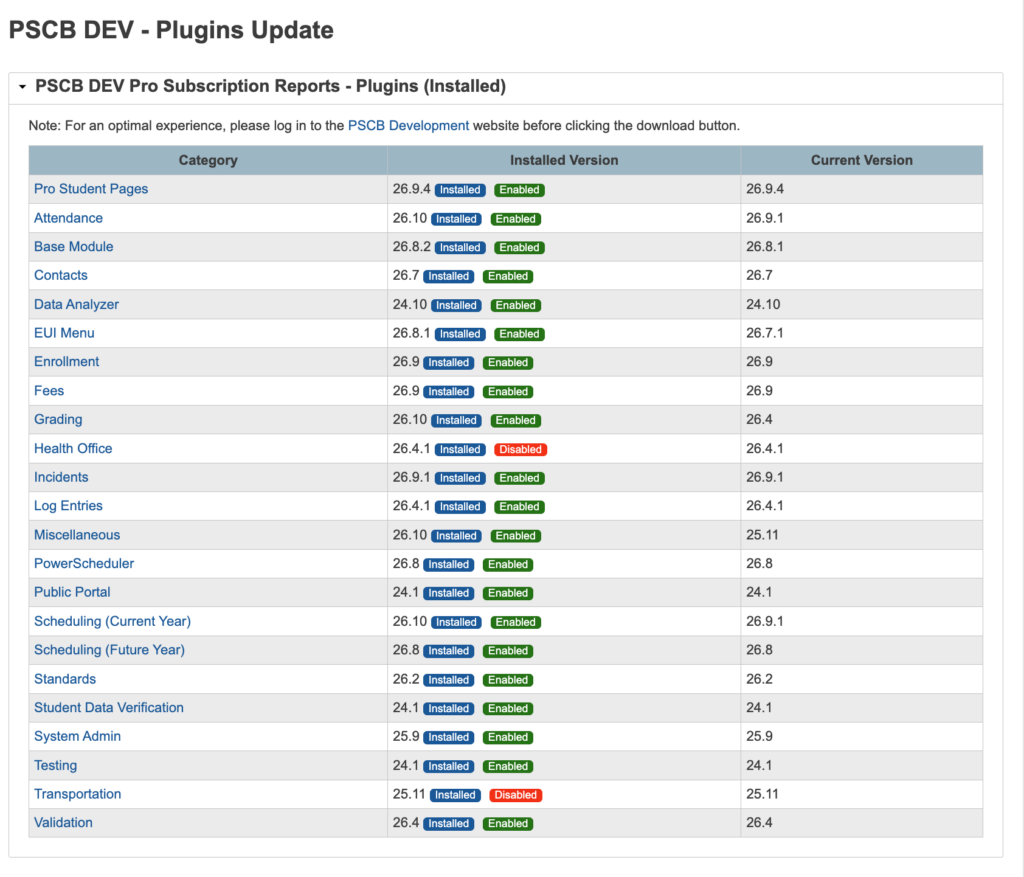
Due to numerous recent enhancements, it is important that users keep their PSCB DEV Custom report plugins up to date. To facilitate this process a new Check for Custom Reports Plugin Updates page has been created.
|
Note: The PSCB DEV Pro – Custom Reports (Base Module DA) v26.8.2 plugin needs to be installed first in order for the Reports Plugin Updates page to display the correct update information.
|
|
Navigate to the following location in PowerSchool to view this page.
|
Click the System Management link in the left Navigation Menu
Click on the PSCB DEV Pro Custom Reports Management link.
Click on the Check for Custom Reports Plugin Updates link.
Review the Plugins Version List to determine which plugins need to be updated.
|
|
|

|
PSCB Subscription - Payment Options
ACH Bank Transfer (Preferred Payment Method)
If your payment choice is ACH Bank Transfer, please send your ACH Bank Transfer authorization form to admin@rastechpscb.com. A completed form will be sent to your Business Office.
|
Check
Payments by check should be mailed to:
RAS Technology Consultants, Inc.
2 Otter Creek Road
Skillman, NJ 08558
|
Credit Card (Surcharge: 2.99%)
If your payment choice is Credit Card, please send a request to admin@rastechpscb.com. A payment link will be sent to your attention.
|
|
|
|